01 / COMPARE
See your choices together.
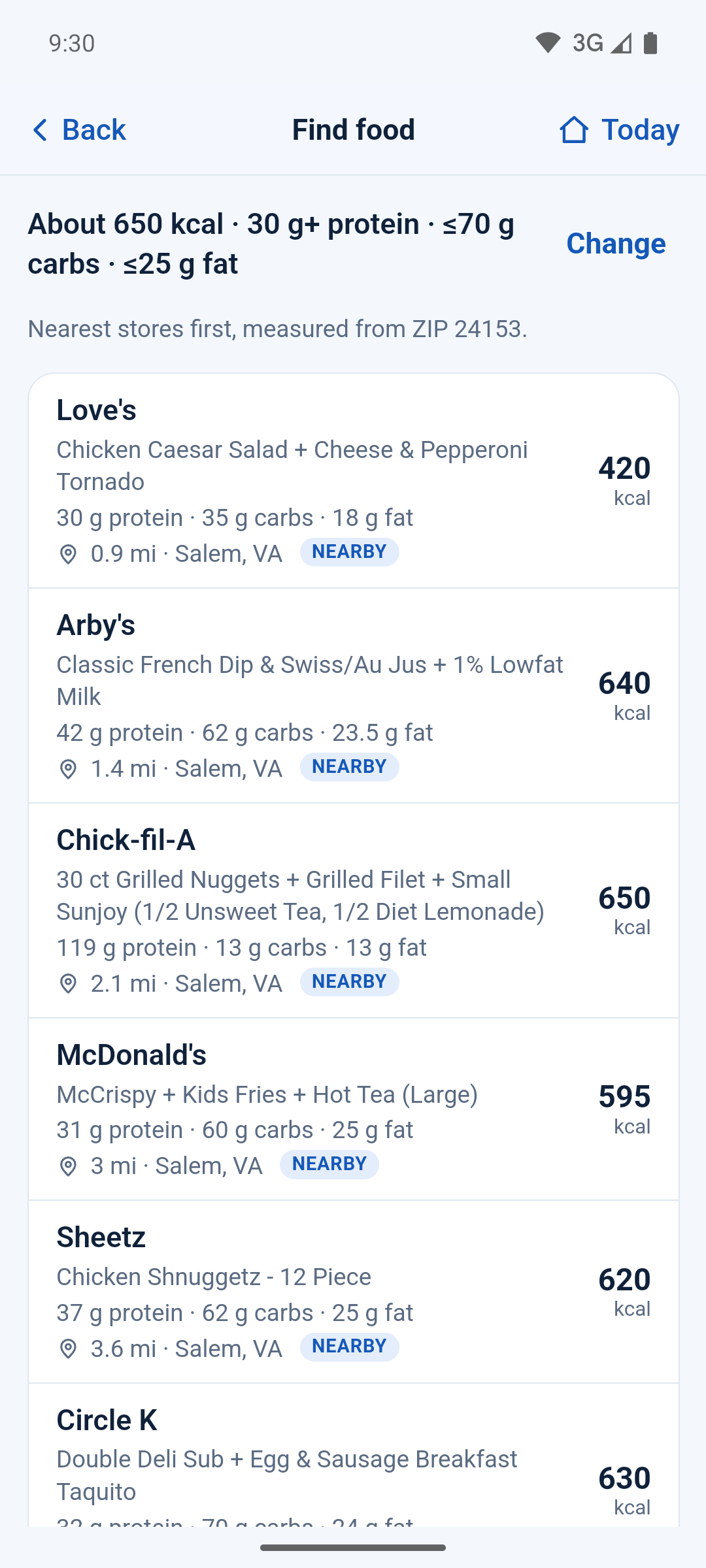
Compare single items and same-chain meal combinations.
 Pit Stoppowered by Appalachian Integrity
ONE REQUEST. ACROSS SUPPORTED BRANDS.
Enter calories and protein once. Pit Stop searches food options across supported gas stations, regional favorites and sit-down chains. In the U.S., use your ZIP code or optional location. European searches use phone location.
Single items or meal combinations. One set of nutrition totals.
Gas stations Regional favorites Sit-down chains
Find food coverage varies by brand and location.Restaurant and packaged-food records. A brand can have separate menus in different countries. Mapped locations are distinct by brand and coordinates; nutrition and nearby-meal coverage vary.
FROM A TARGET TO A STOP
Set approximate calories and a protein minimum. Add carb and fat limits when you need them.
See qualifying food from supported brands together. Compare nutrition totals and distance when a store is known.
Pit Stop can combine items at the same stop, check their totals, and show what to order.
A LOOK INSIDE
Pit Stop can put a main, a side and a drink together at the same place, then check the combined nutrition against your targets. Compare the meal totals before you order.
Compare single items and same-chain meal combinations.
See each item, the combined calories and macros, and directions.

Open a food’s source link when one is available.

TAKE YOUR TARGETS WITH YOU
Keep the interface in English, German, French, Italian or Portuguese. Choose the country separately.
United States, Germany, Switzerland, Italy and Portugal.
Outside the U.S., nearby searches use your phone’s location and kilometres. Food names stay as each place publishes them. Typed free-word filters currently read English.
SAY IT YOUR WAY
Add plain-word filters to narrow your options. Pit Stop shows what it understood so you can check the request.
Your remaining daily amounts can fill the form. You can also enter targets for your next meal directly.
Explore the app on Google PlayBEFORE YOUR NEXT STOP
Nutrition information can be incomplete or out of date. Check the restaurant’s current information when it matters.
No. Enter nutrition requirements for your next meal directly. If the form uses your remaining daily amounts, you can edit them.
No. The calorie target is approximate. Results may fall below it or up to 10% above it. The entered protein minimum and carb/fat limits still apply. There may be no qualifying option.
No. Find food searches the supported chains and food records it carries. Coverage varies by location and menu.
Find food uses chain nutrition records. Open a food’s detail page for its published source link when available. Information can be incomplete or out of date.
PIT STOP